RFID Printing & Encoding
An RFID printer does three jobs in one pass: it prints the visible label, writes data into the tag chip and checks that the tag works. This chapter explains how that process works, how to choose and set up a printer, where the data comes from, and how to fix the problems that cause wasted labels.
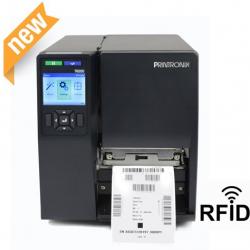
- An RFID printer prints the label, encodes the chip and reads it back to verify, rejecting any tag that fails.
- Calibration sets where the inlay sits over the encoder antenna; wrong position or wrong media settings are the most common cause of failures.
- Failed tags are overstruck with a VOID pattern and the job retries on the next label, so the void rate is a key quality metric.
- Encoding data, especially unique serial numbers, should come from the business system or label software, never be typed by hand.
- Choose between on-demand printing and pre-encoded batch labels based on volume, variability of data and where the labels are applied.
How an RFID printer works
An RFID printer is a thermal label printer with an RFID reader-encoder and a small antenna built into the media path. RFID labels - sometimes called smart labels - look like ordinary paper or synthetic labels, but each one carries an inlay (chip plus antenna) laminated between the face stock and the liner. As each label passes through the printer, three things happen:
- Encode: the label stops, or slows, with its inlay over the encoder antenna, and the printer writes data such as the EPC into the chip memory.
- Verify: the printer reads the tag back and compares what it reads with what it wrote. If the tag does not respond, or the data does not match, the label is treated as defective.
- Print: the printhead prints the barcode, text and graphics on the face of the label using direct thermal or thermal transfer printing.
The order of encoding and printing varies between models and settings, but the principle is the same: one pass produces a label whose printed information and chip data match, and whose tag has been tested. This is what makes on-site printing reliable enough for shipping labels, asset tags and retail tickets.
The data written is usually an EPC in the EPC memory bank, sometimes with user memory, passwords and lock settings. If these terms are new, read EPC encoding and tag memory first.
Desktop vs industrial RFID printers
RFID printers come in the same broad classes as barcode printers. The right class depends on volume, duty cycle and environment more than on the RFID function itself.
| Aspect | Desktop RFID printer | Industrial RFID printer |
|---|---|---|
| Typical use | Offices, retail back rooms, small asset-tagging projects, sample runs | Warehouses, factories, distribution centres, continuous shifts |
| Volume | Low to moderate daily volumes | High volumes and long continuous runs |
| Media capacity | Smaller rolls, frequent changes | Large rolls and ribbons, fewer changes |
| Build | Plastic housing, compact | Metal frame, built for dust and heavy use |
| Options | Basic connectivity, sometimes cutter or peeler | Wider choice of print widths, resolutions, applicators, networking and on-metal media support |
| Cost | Lower purchase cost | Higher purchase cost, lower cost per label at volume |
There are also print-and-apply systems that encode, print and apply labels automatically on a packing line, and mobile printers with RFID encoding for field use. Whatever the class, check that the printer supports the inlay types, label sizes and chip types you plan to use. Indian RFID's range of RFID printers covers desktop and industrial models.
In the real world
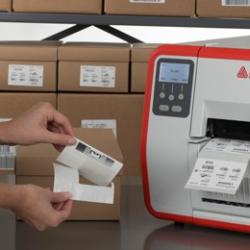
Inlay position and calibration
For reliable encoding, the inlay must sit in the right place relative to the printer's encoder antenna at the moment of writing. Two settings control this:
- Media settings: label length, gap or black-mark sensing, and label width, so the printer knows exactly where each label starts.
- Encoding (program) position: how far the label is advanced, or backed up, before the chip is written, and at what encoding power.
Most RFID printers have an RFID calibration routine. The printer feeds labels, tries to encode at a range of positions and power levels, and selects the best combination for that media. Run calibration whenever you load a new label type, a different inlay or a new supplier's batch - and after any repair.
The inlay's location within the label is called its placement or offset, and the distance from one inlay to the next along the roll is the inlay pitch. Printer manufacturers publish which inlays, placements and minimum pitches each model supports. Ordering media that matches these recommendations avoids most problems before they start.
Void and defective tag handling
Not every inlay works. A small proportion can be dead from manufacture, and others are damaged by rough handling, static, bending or crushing. An RFID printer deals with this automatically:
- The printer tries to write and verify the tag.
- If the tag fails, it retries a set number of times, sometimes adjusting power.
- If it still fails, the printer overstrikes the label - prints a VOID pattern or text across it - so it cannot be used by mistake.
- It then repeats the same job on the next label, so the data sequence is not lost.
- After a configurable number of consecutive failures, the printer stops and reports an error, because repeated failures usually point to a setting or media problem rather than bad luck.
Monitor the void rate - voided labels as a percentage of labels printed. A low, steady rate is normal; a sudden rise signals a calibration, media or hardware issue. Voided labels should be collected and destroyed, not peeled and reused.
Encoding data from ERP and label software
What goes into the chip should be decided by the data design, not by the person at the printer. In a well-run system:
- The ERP, WMS or asset system holds the master data: product code, batch, asset number or shipment details.
- Label design software or middleware takes that data, converts it to the EPC format chosen (for example an SGTIN or SSCC-based EPC, or a company-specific asset numbering scheme), and sends a print job containing both the visible label content and the RFID write command.
- Every EPC that must be unique - most item-level and asset schemes - gets a serial number from a controlled source, so no two tags carry the same code.
- After printing, the printer or software reports which EPCs were written successfully, and this encoding log is stored for reconciliation.
Printers are driven by their command languages, which include commands to set up RFID parameters, write data to a memory bank, and read data back. Most organisations do not write these commands by hand; they configure templates in label software or integrate through RFID middleware. For GS1-based schemes in India, GS1 India allocates the company prefix on which SGTIN and SSCC codes are built.
Locking and passwords
Encoding can also set an access password, a kill password and lock states for memory banks. Locking prevents the EPC from being changed later by someone with a reader. It is common for supply-chain labels and asset tags, but it should be a deliberate decision because a permanently locked tag cannot be rewritten if the data design changes.
Label design: barcode, human-readable and RFID
An RFID label should still work as a normal label. Good designs combine three layers of identification:
- Barcode (linear or 2D) carrying the same identifier, or a related one, as a fallback when RFID cannot be read.
- Human-readable text so people can identify the item without any device.
- RFID inlay carrying the EPC, plus an optional RFID emblem so staff know the label contains a tag.
Practical layout rules:
- Avoid printing a barcode directly over the chip. The chip forms a small bump, which can cause print voids and also puts extra printhead pressure on the chip.
- Leave the inlay area free of heavy, dense graphics where possible.
- Choose face stock and ribbon to suit the environment: synthetic face and resin ribbon for moisture, abrasion and chemicals; paper with wax or wax-resin for general use; direct thermal only for short-life labels.
- For metal items, use on-metal RFID labels designed for printing, not a standard inlay - see UHF RFID labels for the label types available.
Pre-encoded batches vs on-demand printing
| Factor | Pre-encoded labels (batch) | On-demand printing and encoding |
|---|---|---|
| Where it happens | Label converter or service bureau, before delivery | At your site, when each label is needed |
| Best for | Large runs with predictable data, such as asset numbering series or retail tags applied at source | Variable data: shipments, work orders, assets registered on the spot |
| Equipment on site | None for encoding; ordinary application | RFID printer, software and trained users |
| Flexibility | Low - data fixed in advance | High - any data, any time |
| Data linkage | Supplier provides a file of EPCs that must be imported and linked to items | Linkage created automatically at print time |
| Risks | Lost or mixed rolls break sequences; duplicate-file errors | Printer downtime stops labelling; needs calibration discipline |
Many projects use both: pre-encoded labels for high-volume, predictable items and an on-site printer for exceptions, replacements and variable data.
Common problems and fixes
| Problem | Likely cause | Fix |
|---|---|---|
| Adjacent-tag encoding (the wrong label is written, or the neighbouring tag also responds) | Encoder field reaching the next inlay, usually with short labels, tight pitch or too much encoding power | Recalibrate; reduce encoding power; use media with an inlay pitch the printer supports; check placement setting |
| Wrong inlay pitch or position | Media not matching the printer's supported inlays or settings from a previous roll | Load correct media settings, run RFID calibration, order media to the printer maker's specification |
| High void rate on a new roll | Damaged inlays, different chip or inlay from the previous batch, or no recalibration | Recalibrate; test sample labels with a handheld; return faulty batches to the supplier |
| Read verification failures with good inlays | Encoding power too low or too high, wrong memory bank or data length in the job | Check job template and EPC length; recalibrate power; confirm chip memory supports the data |
| Faded or patchy print over the inlay | Chip bump under the printhead; wrong ribbon or heat setting | Move print fields away from the chip; adjust darkness and speed; match ribbon to face stock |
| Ribbon wrinkle or media drift | Ribbon tension, head pressure or worn platen roller | Adjust tension and pressure, clean or replace platen, use the correct ribbon width |
| Printer stops after repeated voids | Consecutive-failure limit reached | Treat as a setting or media fault, not a one-off; investigate before restarting |
| Duplicate EPCs in the system | Serial numbers reused, jobs reprinted manually, or pre-encoded files imported twice | Generate serials centrally, block manual reprints of the same EPC, reconcile encoding logs |
Quality control
A simple quality-control routine keeps printing reliable:
- Incoming media check: on each new batch, confirm the inlay type matches the specification and test a sample with a handheld reader.
- Calibrate on change: run RFID calibration for every new media type or batch.
- Keep verification on: never disable read-after-write verification to "speed up" printing.
- Track void rate: record it per shift or per roll, and investigate trends.
- Audit sample labels: read finished labels with a handheld to confirm the EPC matches the barcode and the system record.
- Test in the application: periodically check that labels applied to products still read at the real read points, not just in the printer.
- Store media properly: in original packaging, away from heat, humidity and sharp bends, which can crack inlay antennas.
- Maintain the printer: clean the printhead and platen, and keep firmware at a version supported by your label software.
Before committing to a label and printer combination, make sure the tag itself has passed the tests in RFID site survey and tag testing. Printing a perfect label is of little value if the tag cannot be read on the product. Hands-on printer set-up, calibration and encoding are also part of the Certified RFID Specialist Program for those who want guided practice.
Watch & learn
Videos are from YouTube and their respective creators; they play only when you click.
Help India adopt this fast-growing technology - teach, consult or build projects with Indian RFID.
Frequently asked questions
Can a normal barcode printer encode RFID labels?
Only if it has an RFID encoder module fitted. Many thermal printer models are available in RFID-enabled versions, and some can be upgraded, but a standard barcode printer cannot write to a tag chip.
Why does my RFID printer void so many labels?
The most common causes are an uncalibrated or wrong encoding position, media settings that do not match the inlay pitch, weak or damaged inlays from poor storage, and encoding power set too high or too low. Recalibrating for the specific media usually fixes most cases.
Should I print a barcode on an RFID label as well?
Yes, in most applications. A barcode and human-readable text give a fallback if the tag is damaged or a reader is not available, and they let staff identify the item by eye.
What is the difference between pre-encoded and on-demand RFID labels?
Pre-encoded labels are written in bulk by the label converter or a service bureau and delivered ready to apply. On-demand labels are encoded and printed at the moment they are needed, usually with item-specific data from the business system.
Do I need to lock the tag after encoding?
It depends on the application. Locking the EPC memory and setting access and kill passwords prevents accidental or unauthorised rewriting, which matters in open supply chains, but it also stops legitimate re-use, so the decision should be part of the data design.
Join the 1-month Certified RFID Specialist Program - live online. New batch 12 January 2027.