RFID Printers: Types, How They Work & How to Choose
An RFID printer prints a label and writes data into the tag chip inside it in the same pass. This chapter compares desktop, commercial and industrial RFID printers, explains media, ribbons, connectivity and maintenance, and gives a step-by-step way to choose the right model and keep it running.
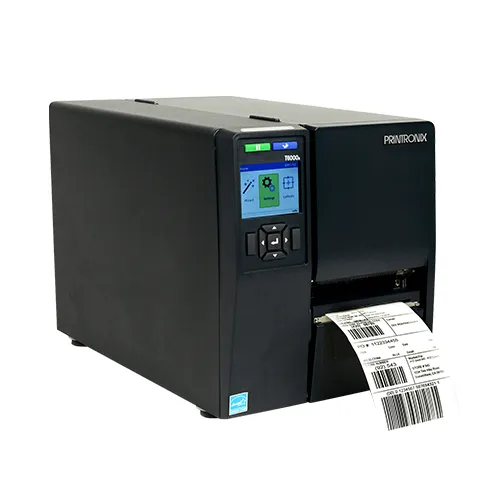
- RFID printers come in desktop, mid-range commercial and industrial classes; choose by daily volume, duty cycle and environment, not by price alone.
- A printer is built for one RFID frequency family, usually UHF (865-867 MHz in India) or HF/NFC, so match the printer to your tags.
- Thermal transfer printing with the right ribbon gives durable labels; direct thermal suits short-life labels such as shipping and returns.
- Most encoding failures come from media settings and calibration: inlay position, pitch and RF power must match the exact label you load.
- Total cost of ownership includes labels, ribbons, printheads, software and integration effort, which often outweigh the printer price over its life.
What an RFID printer is
An RFID printer is a thermal label printer with a small RFID reader-encoder and a short-range coupler antenna built into the media path. As each label passes the coupler, the printer writes data into the chip of the inlay hidden inside the label, reads it back to check it, and prints the visible face - barcode, text and logos - in the same pass. If a tag fails, the printer marks that label as void and tries again on the next one.
This chapter is about the hardware: the classes of printer, the media they use, how to choose one and how to keep it working. For the step-by-step mechanics of writing a tag see RFID Encoders Explained, and for data flow, label design and void handling in depth see RFID Printing & Encoding.
Desktop, commercial and industrial RFID printers
RFID printers follow the same three classes as ordinary thermal printers. The RFID module is broadly similar across classes; what changes is the mechanism, the media capacity and how many hours a day the printer is designed to run.
Desktop RFID printers
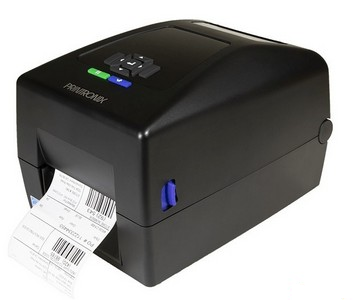
Compact, plastic-bodied printers that take small label rolls and usually narrow ribbons. They suit low volumes: a clinic labelling samples, a small retailer tagging new stock, an office tagging IT assets, or a pilot project. They are quiet and inexpensive but are not built for continuous shift work.
Mid-range (commercial) RFID printers
Metal or reinforced chassis, larger roll and ribbon capacity, faster print speeds and often a display for configuration. They are the common choice for warehouse workstations, garment tagging stations and dispatch desks that print a few thousand labels a day.
Industrial RFID printers
All-metal printers designed for multi-shift operation, large rolls, wide labels and high print speeds. They often support options such as cutters, peelers, rewinders and applicator interfaces. Use them for distribution centres, manufacturing lines and service bureaus that encode large batches.
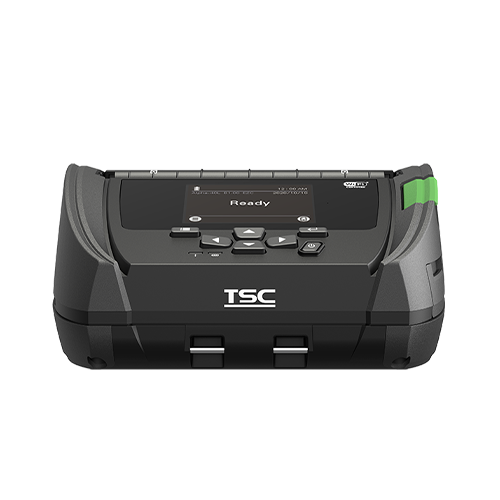
Major makers of thermal printers - including Zebra, TSC/Printronix, SATO and Honeywell, among others - offer RFID-enabled models in one or more of these classes. Exact capabilities differ by model and region, so always confirm the frequency version and supported inlay positions with the supplier.
| Class | Typical use | Typical daily volume (indicative) | Duty cycle |
|---|---|---|---|
| Desktop | Small shops, labs, office asset tagging, pilots | Up to a few hundred labels | Intermittent |
| Mid-range / commercial | Warehouse desks, garment tagging, dispatch | Hundreds to a few thousand | One shift, regular use |
| Industrial | Distribution centres, factories, service bureaus | Several thousand and above | Multi-shift, continuous |
In the real world
UHF vs HF/NFC printer models
The encoder in an RFID printer works on one frequency family. Most RFID printers sold for supply chain, retail and asset work are UHF (EPC Gen2 / ISO/IEC 18000-63) models. In India they must be configured for the 865-867 MHz band; a printer imported with a different regional setting may encode poorly or be non-compliant, so ask for the India region to be set.
HF/NFC printer models encode 13.56 MHz labels (ISO/IEC 15693 and NFC types) for libraries, pharmaceuticals, consumer engagement labels and some healthcare uses. They are a smaller market, and fewer models offer them. A UHF printer will not encode an NFC label and vice versa, so decide the tag technology first - the RFID frequencies chapter explains the trade-offs.
Print technology: thermal transfer, direct thermal and ribbons
Direct thermal printing darkens heat-sensitive label paper. There is no ribbon, so running costs are low, but the image fades with heat, sunlight and abrasion. It suits shipping labels, returns and anything with a life of weeks.
Thermal transfer printing melts ink from a ribbon onto the label. It produces durable images on paper and synthetic materials and is the normal choice for asset tags, garment labels, cartons that travel long distances and anything exposed to handling. Three ribbon families are common:
- Wax - economical, for paper labels with moderate durability.
- Wax-resin - better smudge and scratch resistance, works on coated paper and many synthetics.
- Resin - for polyester, polyimide and other synthetics needing resistance to chemicals, heat or solvents.
Match the ribbon to the label face and the environment, and choose a ribbon at least as wide as the label to protect the printhead. Most RFID labels have a slight bump where the chip sits; good printers and quality labels handle it, but printing heavy graphics directly over the chip area is best avoided.
How print-encode-verify-void works
For every label the printer follows the same sequence: it advances the label so the inlay sits over the coupler, writes the data (typically the EPC, sometimes user memory, passwords and lock settings), reads the tag back to confirm the write, then prints. If the verify step fails, the printer overstrikes the label with a VOID pattern, advances to the next label and retries, up to a configured limit.
That loop is what makes RFID printing trustworthy: every good label leaving the printer has been proven to work at least once. The details - encoding commands, retry counts, locking and serialisation - are covered in the encoder and printing chapters linked above, so they are not repeated here.
Media, inlay placement and calibration
Smart-label and RFID-ready media
RFID labels are converted by laminating an inlay between the face stock and the adhesive. For the printer to encode reliably, the inlay must sit within the zone the printer's coupler can address, and the label length and gap (the pitch) must be supported. Printer makers publish supported inlay positions and minimum label sizes; converters design "RFID-ready" labels to match. Buying media that is not designed for your printer class is a common cause of high void rates.
Calibration
Calibration has two parts. Media calibration teaches the printer the label length and gap or black-mark position. RF calibration finds the best encoding position and power for that specific inlay. Many printers can run an automatic RF calibration that scans positions along the label and picks the most reliable one. Recalibrate whenever you change label type, inlay supplier or roll width.
On-metal and specialty media
Some printers can encode thicker on-metal labels that carry a foam spacer, as well as flexible tags for tyres, textiles or high-temperature use. These need printers that support thicker media and adjusted head pressure, and sometimes a different encoding position. Confirm thickness limits with both the printer and the label supplier before ordering, and test a full roll, not a few samples.
Connectivity, drivers and label software
Most RFID printers offer USB and Ethernet as standard, with Wi-Fi, serial or Bluetooth available on many models. For shared workstations and ERP-driven printing, wired Ethernet is the most dependable choice; Wi-Fi suits mobile carts.
Printing can be driven in three common ways:
- Label design software - templates with barcode, text and an RFID field, linked to a spreadsheet or database.
- Windows drivers - for printing from business applications, with RFID data passed through driver fields or embedded commands.
- Direct command language - the ERP, WMS or middleware sends the printer's native language with the EPC as a variable. This is the most controllable route for high volumes.
Whatever the route, unique serial numbers should come from a system that guarantees uniqueness, not from a person typing. The middleware chapter covers how printing fits into the wider data flow.
Throughput and duty cycle
Printer datasheets quote print speed in millimetres or inches per second, but RFID throughput is lower than barcode throughput because the printer pauses to encode and verify each tag. Larger EPC writes, user-memory writes, locking and retries all add time. When estimating, measure labels per minute with your real label, data and settings rather than relying on print speed alone.
Duty cycle matters as much as speed. A desktop printer can match an industrial printer for a short burst, but it is not designed to run eight hours a day, every day. Undersizing the printer is a common cause of early failures.
Choosing an RFID printer
Work through five questions:
- Volume - labels per day now and in two years, and peak hour demand.
- Label size and media - width, length, inlay position, on-metal or thick media.
- Environment - office, warehouse dust, factory heat, cold store.
- Data source - manual entry, spreadsheet, ERP/WMS integration.
- Verification needs - is read-back enough, or do you also need barcode verification, tag locking or encoded data logging for audit?
| Scenario | Suggested class | Notes |
|---|---|---|
| Office IT asset tagging, a few hundred tags once | Desktop | Or buy pre-encoded labels instead |
| Retail store tagging inbound stock | Desktop or mid-range | Thermal transfer for garment tags |
| Warehouse dispatch, carton and pallet labels | Mid-range or industrial | WMS integration, Ethernet |
| Factory work-in-progress tags, multi-shift | Industrial | Resin ribbons, dust-tolerant |
| On-metal asset tags in bulk | Industrial with thick-media support | Test the exact tag first |
| Library or NFC marketing labels | HF/NFC model | Confirm chip type support |
You can review RFID printer options and media pairing on our RFID printers page.
Total cost of ownership
The printer is often the smallest part of the long-term cost. A realistic budget includes:
- Printer hardware - RFID versions cost noticeably more than the equivalent barcode model; indicatively, desktop units start in the lower lakh range in INR and industrial units cost several times more, depending on options.
- Labels - RFID labels cost many times more than plain labels; at volume, this dominates.
- Ribbons - recurring, chosen by durability needed.
- Printheads and platen rollers - consumable parts replaced over the printer's life.
- Software and integration - label software licences, ERP connectors and testing time.
- Wasted labels - every voided RFID label is money lost, so good calibration pays back quickly.
Figures above are indicative only; get current quotes for your exact configuration. The RFID cost and ROI chapter shows how to build a full business case.
Maintenance and upgrading a barcode printer
Routine maintenance
- Printhead - clean with isopropyl alcohol pens or swabs at every ribbon change, or more often in dusty areas.
- Platen roller - clean adhesive build-up; replace when worn or glazed.
- Media path and sensors - remove dust and label fragments that cause mis-feeds.
- RF calibration - repeat on media changes and periodically as a check.
- Firmware - keep up to date, as updates can improve support for newer chips.
Upgrading with an RFID kit
Some models in some printer families support factory-fitted or field-installed RFID upgrade kits, which add the encoder and coupler to an existing barcode printer. This can protect an investment, but check carefully: the kit must match the printer model, the frequency version and the region, and the result should be tested with your intended labels. Not every barcode printer can be upgraded.
Common problems and fixes
| Problem | Likely cause | Fix |
|---|---|---|
| Many labels voided | Wrong encoding position or power; unsupported inlay position | Run RF calibration; confirm media is supported by the printer |
| Voids every few labels, in a pattern | Wrong label length or gap setting | Run media calibration; check sensor position |
| Neighbouring tag gets encoded | Encoding power too high or labels too short | Lower power; use label pitch supported by the printer |
| Printed image faint over chip area | Chip bump, low head pressure | Move graphics away from the chip; adjust pressure and darkness |
| Labels fade or smudge | Direct thermal or wrong ribbon | Switch to thermal transfer with wax-resin or resin ribbon |
| Tags read in printer but not in the field | Wrong inlay for application or surface | Re-select tag; test on the real item - see read-range chapter |
| Duplicate EPCs | Serials generated manually or reset | Generate serials from one controlled system |
If tags encode perfectly but perform poorly once applied, the issue is usually tag selection or placement rather than the printer; see RFID read range. For hands-on training with printers, encoders and live projects, the RFID courses in India include practical printer setup sessions.
Watch & learn
Videos are from YouTube and their respective creators; they play only when you click.
Help India adopt this fast-growing technology - teach, consult or build projects with Indian RFID.
Frequently asked questions
Is an RFID printer different from a barcode printer?
An RFID printer is a thermal barcode printer with a built-in RFID reader-encoder and antenna in the media path. It prints the visible label and also writes and verifies data in the tag chip.
Can one printer encode both UHF and NFC labels?
Usually not. Most RFID printers are supplied in either a UHF version or an HF/NFC version, so you should decide which tag family you need before buying.
Do RFID printers need special labels?
They need RFID labels whose inlay position and pitch are supported by the printer. Labels sold as RFID-ready for a given printer class have been designed so the inlay sits where the encoder can reach it reliably.
How long does an RFID printhead last?
Printhead life depends on media abrasiveness, ribbon quality, darkness settings and cleaning discipline. Using a ribbon slightly wider than the label and cleaning the head regularly extends its life significantly.
Can I print RFID labels directly from my ERP?
Yes. Most enterprise systems can send print jobs through a printer driver, label software or the printer command language, with the EPC or other tag data passed as a field in the job.
Join the 1-month Certified RFID Specialist Program - live online. New batch 12 January 2027.