RFID for Jewellery: Stock Audits, Security & Sales
Jewellery stores hold thousands of small, high-value pieces that move constantly between counters, safes, karigars and exhibitions. This chapter explains how RFID jewellery tags, readers and software turn hours of manual stock checking into minutes, and how to plan a practical rollout for a showroom.
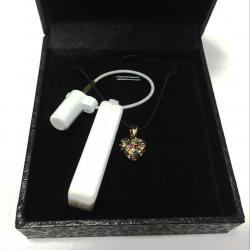
- Each jewellery piece gets a small UHF RFID tag (dumbbell, rat-tail or tail tag) tied on with thread, encoded and linked to its item record.
- A handheld reader can count a whole showroom without opening every box, and tray readers check a tray in seconds.
- Software reconciles stock, manages trays, links billing, tracks karigar issue/receipt, branch transfers and exhibition stock.
- Metal-dense trays need care: near-field tray readers, tags kept spaced and lying flat, and tags tuned for the setting.
- Start with a pilot on one section, clean the item master first, and keep barcodes printed on the tag as a fallback.
The jewellery-store problem
A jewellery showroom is one of the hardest retail environments for stock control. A medium-sized store can hold thousands of individual pieces - rings, earrings, chains, bangles, pendants, mangalsutras - and each one is small, high in value and often similar in appearance to dozens of others. Losing even one piece is a serious loss, so most stores count stock every day.
Done by hand, that daily count is slow. Staff open each tray, count the pieces, match them against a register or a barcode list and sign off. In a busy store this can take hours before opening and again at closing, and it still misses errors. Several other realities make the problem worse:
- Trays move. Trays are carried between counters, shown to customers, taken to the safe and brought back. A piece placed in the wrong tray looks "missing" until someone finds it.
- Theft and sleight of hand. Swapping a real piece for a look-alike, or a piece slipping away during a busy showing, is a known risk.
- Karigar and job-work movement. Pieces go out to karigars (craftsmen) for repair, polishing, resizing or making, and come back days later. Tracking what went out, by weight and by piece, is often done on paper.
- Branch transfers. Chains with several outlets move stock between branches and need proof of what was sent and received.
- Exhibitions and private showings. Stock taken to an exhibition, a trade show or a customer's home has to be counted out and counted back in, often under time pressure.
- Vault audits. Bulk stock in the safe or strong room must be verified regularly, sometimes for insurance or financing purposes.
Barcodes help, but each label still has to be scanned one at a time with a clear line of sight. RFID removes that limit: a reader can identify many tagged pieces at once, without opening every pouch or turning every tag. That is why jewellery has become one of the clearest uses of RFID in retail (see the wider list in RFID applications).
How jewellery RFID works
The tags
Jewellery RFID systems almost always use passive UHF tags (in India, operating in the 865-867 MHz band) because UHF allows many tags to be read quickly at a useful distance. The tags are small, made for hanging off a piece rather than sticking onto it:
- Dumbbell tags - two printable flaps joined by a narrow strip; the strip loops through or around the piece and the flaps fold together.
- Rat-tail tags - a printable label body with a long thin tail that wraps around a ring shank, chain or bangle.
- Tail tags / loop tags - a tag body with a thread or plastic loop that ties to the piece or its packaging.
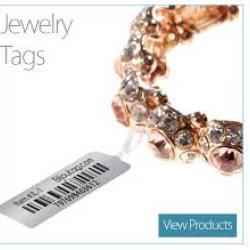
The RFID inlay (chip plus antenna) sits inside the printable part of the tag. The tag face is printed with human-readable details and a barcode: typically item code, gross and net weight, purity (for example 22K or 18K), stone details and price or price code. The tag is attached with thread or a loop so it hangs slightly away from the metal, which helps it read.
Encoding to the item master
Every tag carries a unique ID. When a piece is tagged, that ID is linked to the piece's record in the jewellery software - the "item master" - so a read instantly tells the system which item it is, its weight, purity, design, supplier and status. This is done in one of two ways:
- Print and encode together on an RFID-capable label printer, which prints the tag face and writes the EPC memory in one pass. See the RFID printers guide.
- Encode at a desk with a small RFID encoder or desktop reader, then associate the tag with the item in software. See RFID encoders explained.
Either way, the golden rule is one tag, one item, one record. Re-using old tags without updating the record is one of the most common causes of mismatched stock.
In the real world
Reading options in the store
Different jobs in a jewellery store need different readers. Most stores use a combination.
| Reader type | Where it is used | What it does |
|---|---|---|
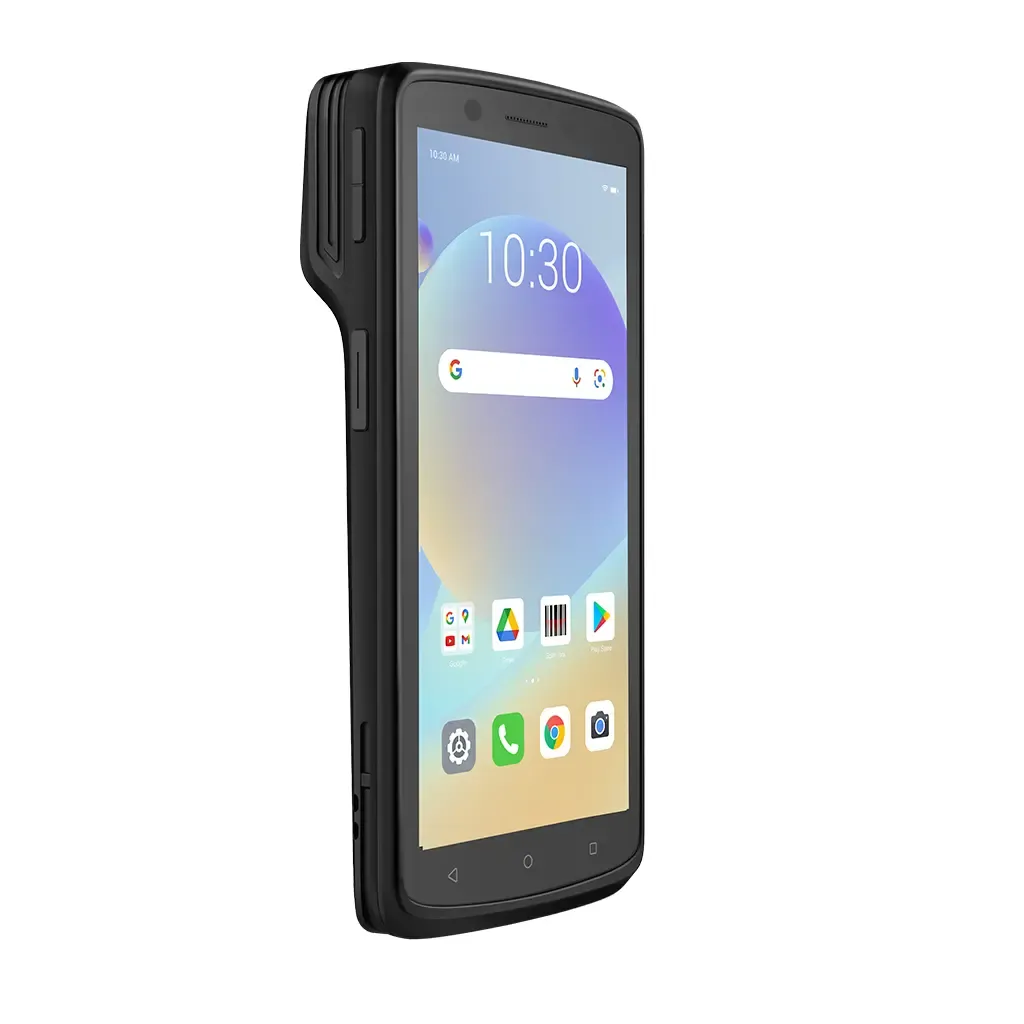
| Handheld reader | Whole showroom, safe, back office | Full stock counts by walking past counters and trays; finding a specific missing piece |
| Tray reader (near-field pad) | Counters, safe room | Reads every tag on one tray placed on the pad; confirms the tray is complete |
| Counter / desk reader | Billing counter, tagging desk | Reads the items a customer is buying straight into the bill; encodes new tags |
| Smart display cabinet | Showcases | Built-in antennas monitor what is inside and flag when a piece is removed |
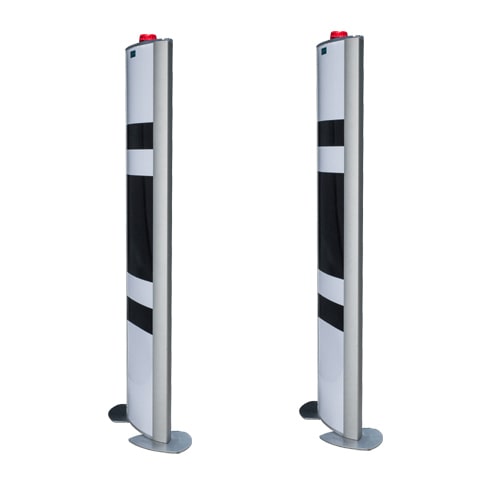
| Exit gate | Store entrance / staff exit | Raises an alert when an unsold tagged item passes (EAS-style) |
Handheld readers for full-store counts
A handheld UHF reader lets one person count an entire showroom by moving past each counter and through the safe. The software compares what was read with what should be there and lists missing or extra items. A handheld in "search" mode can also guide staff to a specific piece by signal strength. More detail is in the handheld RFID readers guide.
Tray and counter readers
A tray reader is a flat pad with a near-field antenna. A salesperson places a tray on it before and after a customer showing; within seconds the screen confirms whether all pieces are present. At billing, a desk reader picks up the selected items into the invoice, avoiding manual entry of item codes and weights.
Exit gates and vault audits
Gate antennas at the door read any tag whose status in the software is still "in stock" and trigger an alarm. Tags are removed or marked as sold at billing so genuine purchases do not alarm. For the safe or strong room, a handheld or a cabinet reader makes periodic vault audits quick enough to do daily rather than monthly. Gate hardware is covered on the RFID gate systems page.
Software: where the value is created
Readers only produce lists of tag IDs. The jewellery software turns those reads into business answers. A good jewellery RFID system usually covers:
- Stock reconciliation - compares reads against expected stock and shows found, missing and unexpected items by section, counter or tray.
- Tray management - assigns items to trays, records which salesperson took a tray out and checks it back in.
- Sales and billing integration - pushes item details into the billing or ERP system and marks items sold, so they drop out of stock and do not trigger the gate.
- Karigar issue and receipt - records pieces sent out for repair or making, with weights, and checks them back in against the issue note.
- Branch transfers - reads a box at dispatch and again at the receiving branch, with a clear difference report.
- Exhibition stock - creates an exhibition list, reads stock out and reads it back, highlighting sold or missing items.
- Reports - daily count history, ageing stock, slow-moving designs, sales by category and audit trails.
Linking BIS hallmarking (HUID)
Under BIS hallmarking, each hallmarked piece carries a 6-character alphanumeric HUID (Hallmark Unique ID). RFID does not replace the HUID - the HUID is laser-marked on the jewellery itself. What RFID software can do is store the HUID as a field in the item record, alongside weight, purity and design. When a tag is read, staff can see the HUID straight away, compare it with the mark on the piece, and include it on the bill. This makes it easier to keep hallmarking records consistent with stock records.
Benefits, with an illustrative comparison
The gains from RFID in jewellery are mostly time, accuracy and confidence. The figures below are illustrative only for a medium store - actual results depend on store size, tag quality, layout and discipline.
| Task | Manual / barcode (illustrative) | With RFID (illustrative) |
|---|---|---|
| Daily full-store count | Several hours with multiple staff | Often under an hour with one or two people |
| Checking one tray after a showing | A few minutes of counting | A few seconds on a tray reader |
| Finding a misplaced piece | Search tray by tray | Handheld locates it by signal strength |
| Exhibition stock out and back | Item-by-item list checking | Read boxes in bulk, review only the exceptions |
| Karigar issue/receipt check | Paper register and weighing | Read and weigh, with automatic matching to the issue note |
Beyond time saved, stores typically value the ability to count every day instead of weekly, faster detection of missing pieces (while the trail is still fresh), better data on which designs sell, and a visible deterrent to theft.
Tag choices and reading tips for metal-dense trays
Gold and silver are metals, and metal affects UHF tags. A tag pressed directly against metal detunes - its antenna's resonant frequency shifts - so it may read poorly or not at all. Pieces packed tightly also shield each other. Practical tips:
- Let the tag hang. Attach with thread or a loop so the inlay sits a few millimetres away from the metal rather than wrapped tightly onto it.
- Keep tags spaced. Tags stacked flat on top of each other read badly. Arrange trays so tags lie side by side, not in a pile.
- Use near-field tray readers for trays. They read tags close to the pad strongly and ignore distant tags, which avoids picking up the neighbouring tray.
- Choose the right tag size. Very small tags are discreet but read at shorter distances. Use the smallest tag that reliably reads in your trays, and test before ordering in bulk.
- Control reader power. At billing, lower power stops the counter reader picking up items in nearby showcases.
- Test with real stock. Heavy bangles, chains in boxes and pieces with large stones behave differently - test each category (see site survey and testing).
Implementation steps for a store
- Define the goals. Daily counts, tray control, theft alerts, karigar tracking, exhibitions - decide which matter most so hardware is chosen to fit.
- Clean the item master. Make sure every piece has a correct code, weight, purity and HUID in the software before tagging. RFID exposes bad data quickly.
- Select and test tags. Trial two or three tag styles on real pieces in real trays.
- Pilot one section. Tag one counter or category, run daily counts for a few weeks and fix the process issues.
- Tag the full store. Plan a tagging drive - often after hours or over a few days - with printers and encoders at a dedicated desk.
- Install readers and gates. Place tray readers, billing readers and exit gates, then tune power and positions.
- Integrate billing. Connect to the billing or ERP system so sold items update automatically.
- Train staff and set routines. Who counts, when, what to do with a mismatch, and how new stock is tagged on arrival.
Costs (indicative ranges)
Costs vary widely with store size, brands and software scope. The ranges below are indicative only to help with budgeting; get a quotation for your actual setup.
| Item | Indicative range (INR) | Notes |
|---|---|---|
| Jewellery RFID tags | A few rupees to roughly Rs 15-20 per tag | Depends on size, quantity and printing |
| Tray / desk reader | Tens of thousands per unit | Usually one per counter or billing point |
| Handheld UHF reader | Roughly Rs 60,000 to Rs 2 lakh+ | Varies with range, Android features and brand |
| RFID label printer | Roughly Rs 1 lakh to Rs 3 lakh+ | Prints and encodes tags |
| Exit gate (pair) | Roughly Rs 1.5 lakh to Rs 5 lakh+ | Depends on width and features |
| Software | One-time or subscription; widely variable | Integration with billing adds cost |
A single showroom often starts with a printer, a handheld, two or three tray readers and software, adding gates and smart cabinets later.
Common problems and fixes
| Problem | Likely cause | Fix |
|---|---|---|
| Some tags in a tray do not read | Tags stacked or pressed onto metal | Spread tags flat and apart; let them hang off the piece |
| Tray reader picks up items from the next tray | Power too high or trays too close | Lower power; keep a gap between trays and the pad |
| Gate alarms on sold items | Item not marked sold or tag not removed | Enforce removing tags at billing; check billing integration |
| Count shows items that were sold | Sales not synced to stock | Fix the billing-to-RFID sync; run reconciliation daily |
| Wrong details shown on reading a tag | Tag re-used or linked to the wrong record | Re-encode and re-link; never re-use tags without updating |
| Poor reads inside the safe | Steel walls and metal boxes block signal | Read with the door open or trays out; use cabinet antennas |
| Tag print fading | Wrong ribbon or label material | Use a resin or suitable ribbon matched to the tag material |
Why jewellers choose Indian RFID
Indian RFID is the RFID division of Mindware, New Delhi, which has worked in barcode, labels and RFID since 1997 - more than 29 years. For jewellers, that means:
- Jewellery tags printed and encoded in-house in Delhi.
- Hardware from leading brands - handheld readers, tray and counter readers, exit gates and RFID printers.
- Jewellery stock software with HUID-linked item records.
- Installation, training and service across India.
- Free samples and on-site trials, so tags and readers can be tested on your own stock before you commit.
- Jewellery barcode labels and ribbons as well, for stores running barcode alongside RFID.
The same team delivers RFID for retail, warehouses, assets, healthcare, vehicles and more - explore RFID applications and our case studies. If you want structured, hands-on training, our RFID courses in India go deeper into implementation.
Watch & learn
Videos are from YouTube and their respective creators; they play only when you click.
Help India adopt this fast-growing technology - teach, consult or build projects with Indian RFID.
Frequently asked questions
Can an RFID tag be attached directly to gold or diamond jewellery?
Not usually. Jewellery tags are tied to the piece with thread or a loop so the tag antenna hangs away from the metal, and the tag is removed at sale.
How long does an RFID stock count take in a jewellery store?
It depends on the store size and setup, but trays that took minutes each to count by hand can typically be read in seconds, and a full showroom count can often finish in well under an hour instead of several hours.
Does RFID replace barcode in a jewellery store?
Most stores keep both. The barcode, weight, purity and price are printed on the RFID tag itself, so the tag still works with a barcode scanner if needed.
Can RFID be linked to the BIS HUID number?
Yes. The HUID is stored as a field in the item record in your jewellery software, and the RFID tag points to that record, so a tag read can show the HUID along with weight and purity.
Will an RFID exit gate stop theft completely?
No security system stops all theft. A gate raises an alert when an unsold tagged item passes, which is a strong deterrent, but it works best combined with CCTV, staff procedures and regular tray audits.
Join the 1-month Certified RFID Specialist Program - live online. New batch 12 January 2027.