Printing and Encoding RFID Labels In-House: Printers, Calibration and Avoiding Wasted Tags
posted on: 15 Oct, 2026 | 06:53:51 PM by Indian RFID
Buying pre-encoded RFID labels is simple, but many businesses eventually want to print and encode labels themselves. In-house printing allows on-demand quantities, last-minute changes and variable data such as order numbers. It also brings new responsibilities: printer setup, calibration, encoding software and serial number management. This guide explains what is involved.
How an RFID printer works
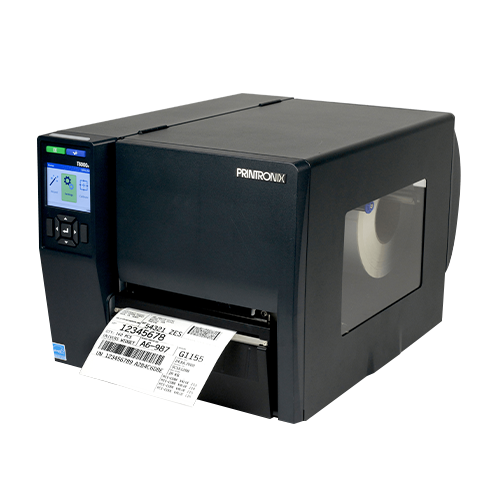
An RFID-enabled thermal transfer printer looks like a normal industrial label printer, with an RFID encoder and antenna built in. For each label it:
- Positions the label so the inlay is over the encoding antenna.
- Writes the EPC (and any user memory) to the chip.
- Reads it back to verify the data was written correctly.
- Prints text, barcodes and graphics on the label face.
- If encoding fails, typically prints a void pattern on the label and retries on the next label.
The result is a label where the printed barcode and the encoded EPC match, which is essential for most retail and logistics programmes.
Choosing a printer
Major brands, including TSC and Zebra, offer RFID-capable models. Key points to consider:
- Volume - desktop printers for low volumes; industrial printers for continuous production use.
- Label sizes and inlay positions - check that the printer supports your label dimensions and inlay placement.
- Print resolution - 300 dpi is often preferred for small labels and 2D codes.
- Regional configuration - the encoder must be set for the correct UHF region.
- Connectivity - Ethernet or Wi-Fi for integration with your systems.
Mindware supplies barcode and RFID printers from leading brands, along with labels and Mynds ribbons to match.
Calibration: the step people skip
RFID printers need to be calibrated for each label type. Calibration finds the best position and power for encoding that particular inlay. Without it, you may see:
- High rates of voided labels.
- Encoding the wrong tag - a neighbouring label on the roll - when power is too high.
- Intermittent failures that are hard to diagnose.
Run calibration whenever you change label stock or inlay type, and record the settings for each.
Encoding software and data
Label design software for RFID printers lets you define both the printed layout and the encoded data. For standard schemes like GS1 SGTIN-96, the software or a middleware service calculates the EPC from GTIN and serial number. Points to control:
- Serial number source - a central counter or database, not a number typed by the operator.
- Reprints - reprinting a label must not create a duplicate EPC unless deliberately intended and recorded.
- Locking - some programmes require EPC memory to be locked after encoding.
- Logging - keep a log of every EPC encoded, with date, printer and order.
Reducing waste
Every voided label wastes a tag. Common causes and fixes:
- Poor calibration - recalibrate for the label type.
- Damaged inlays - store rolls carefully; avoid crushing or bending.
- Static and environment - very dry conditions and nearby metal can affect encoding.
- Low-quality labels - source labels from suppliers who test inlays before shipping.
- Wrong printer settings - such as incorrect label length, causing misalignment.
Track void rates per roll and per printer. A sudden increase usually points to a specific cause.
Verifying output
Periodically check printed labels with a handheld reader and a barcode scanner. Confirm that the EPC decodes to the same item as the printed barcode, and that the barcode itself scans well. For high-volume lines, an inline verification step can check each label automatically.
When to stay with pre-encoded labels
If volumes are steady, lead times are comfortable and your data rarely changes, pre-encoded labels may be simpler and avoid managing printers and software. Many businesses use both: pre-encoded for regular orders and an in-house printer for urgent or variable jobs.
Indian RFID can help set up RFID printing, including printers, labels, ribbons, encoding software and serial management. Share your volumes and label specification through our requirement form, or WhatsApp +91-9717122688 or email gm@indianbarcode.com.
Contact Indian RFID
Indian RFID is the RFID arm of Mindware, which also delivers complete barcode solutions, barcode labels and the full range of Mynds brand barcode ribbons.
Phone / WhatsApp: +91-9717122688
Email: gm@indianbarcode.com
Send your requirement